Pages

Search This Website

Wednesday, March 10, 2021

Outrage: Death of mother-daughter after delivery in Rajkot, family uproar in civil

 Outrage: Death of mother-daughter after delivery in Rajkot, family uproar in civil, young woman climbs on police van; Conflict with police
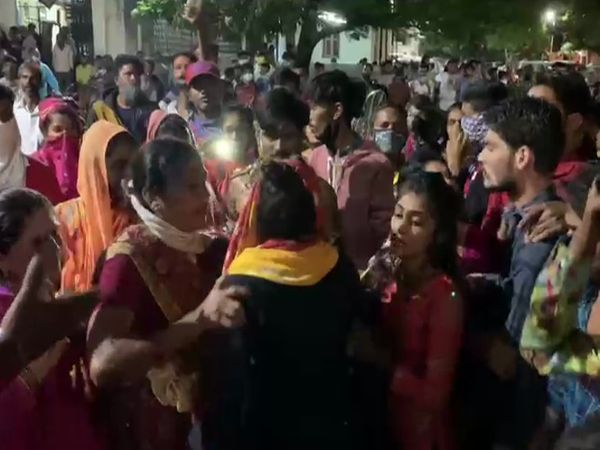
Family members chanted Vijay Rupani Hi Hi and Narendra Modi Hi Hi in civil

Family alleges doctor's negligence in mother's death a day after daughter's death


Anitaben Savanbhai Vaghela, a resident of Valmikivas-1 behind Shethnagar on Jamnagar Road in Rajkot, was brought to the Civil Hospital due to labor pains. Anitaben and her newborn baby girl died after a delivery at the Zina ward of the Civil Hospital last night. A large number of the family members of the deceased gathered and shouted at the doctors and staff for their negligence in the treatment. A young woman got on the police van and Narendra Modi shouted hi hi ... Vijay Rupani hi hi. There were also scenes of clashes between the family and the police. The case was later dropped, assuring justice.

આ પણ વાંચો :- ફી સિલાઈ મશીન યોજના 2020-21

The family members chanted slogans against the government

Family were forced police dhadedhada hospital expressed extreme anger slogans against the government. This time, a daughter of the deceased's family got into a police van and shouted slogans, forcing additional police to be sent as the atmosphere became tense. The case was later dropped after the police assured justice. Seeing the aggression of the family members, there was an atmosphere of tension for a while.

આ પણ વાંચો :- ઘરે બેઠા બેઠા ઓનલાઇન રેશનકાર્ડ કેવી રીતે બનાવવું ? || રેશનકાર્ડ ઓનલાઇન અરજી ફોર્મ 2021

Mother dies one day after daughter's funeral

Anitaben was married a year and a half ago. The latter became pregnant and on March 8, H. was suffering from labor pains. J. Doshi was admitted to the hospital. The daughter was born after a cesarean delivery, but the cost increased as the health of both the mother and daughter deteriorated. T. Children and the mother were admitted to the adultery department. The girl died during treatment. Mother Anitabe also died last night after her funeral.

આ પણ વાંચો :- IPL ટાઈમ ટેબલ 2021 જાહેર જાણો કઈ તારીખે કઈ મેચ છે 

The commotion lasted for one and a half to two hours at the Civil Hospital

The people of the society had gathered at the Civil Hospital with outrage at the negligence shown in the treatment. They chanted slogans against the government and demanded immediate action against the responsible hospital staff and doctors. When the police arrived, a young woman jumped on the police van and shouted slogans.

ગુજરાતીમાં વાંચવા માટે અહિયાં ક્લિક કરો 

 The commotion lasted for an hour and a half. Late last night, the civil superintendent assured the elders of the family that action would be taken if any negligence was found after the forensic postmortem and the matter was settled. The body has been accepted after postmortem in the morning, said Himmatbhai Vaghela, a relative of the deceased.

Read More »

Rape: Young man kidnaps Sagira in eco car in Khandadhar of Gondal

Rape: Young man kidnaps Sagira in eco car in Khandadhar of Gondal, takes her to Madhya Pradesh and commits rape for two and a half months

The uncle of the accused who helped in the abduction was arrested


Rakesh Damore of Madhya Pradesh has abducted Sagira, a family member of a farm laborer in Khandadhar village of Gondal taluka, in an eco-vehicle after giving her the lure of marriage. Sagira's family has lodged a complaint at the Gondal taluka police station.

આ પણ વાંચો :- IPL ટાઈમ ટેબલ 2021 જાહેર જાણો કઈ તારીખે કઈ મેચ છે 

The accused's uncle assisted in the abduction

Police have registered a complaint against Rakesh Damore under sections 376 (2) (n), 363, 366, 114 of the IPC and sections 4 and 6 of the Poxo Act, as well as a case against Rakesh Damore's uncle Takaria for assisting in the abduction. Is delivered. Gondal taluka police have arrested Takaria and are conducting interrogation.

આ પણ વાંચો :- ઘરે બેઠા બેઠા ઓનલાઇન રેશનકાર્ડ કેવી રીતે બનાવવું ? || રેશનકાર્ડ ઓનલાઇન અરજી ફોર્મ 2021

Misdemeanor lasted for two and a half months

Taluka PSI M.J. Parmar said Sagira was abducted on January 18. The accused later took him to Madhya Pradesh. Sagira, who had been raped several times over a period of about two and a half months, was handed over to her parents. Further investigation in this regard was conducted by K.N. Conducted by Ramanujan.

આ પણ વાંચો :- ફી સિલાઈ મશીન યોજના 2020-21

Rape on 17-year-old Sagira in Rajkot

Ajay Bhupat Dudharejia, a laborer living in Manchhanagar area near the old marketing yard in Rajkot, fell in love with a 17-year-old girl. When the girl was alone at home, he threatened to defame her in the society and made her a victim of lust. After the girl's mother lodged a complaint at the B Division police station, the police arrested the accused and took action against him.

ગુજરાતીમાં વાંચવા માટે અહિયાં ક્લિક કરો 

The girl had been in love with the accused for a year

According to the girl's mother in the complaint, she has 6 children in total and out of 6 children, the 17-year-old girl has been in a love affair with Ajay for the last 1 year. On March 1, the girl was alone at home and this time Ajay had asked her to have sex at home. However, the girl refused and threatened to kill him and defame him in the society. Not only that, the girl also said that whenever she was alone at home, she would have such a forced sexual intercourse.

Read More »

LIVE video of the murder. Banevi kills brother-in-law to settle his girlfriend in Surat,

 LIVE video of the murder: Banevi kills brother-in-law to settle his girlfriend in Surat, kills four including younger brother-in-law's pregnant wife

The merchant reached the point of murder in order to settle down with his girlfriend and divorce his wife


The entire family fled in public after being brutally killed by Banevi's brother-in-law at Nilkanth Society in Katargam, Surat city.  Banavi has been accused of killing his brother-in-law over a year-long dispute over his wife's divorce.  A living example has come to light in which a businessman engaged in textile job work led to the murder in the lure of divorcing his wife to settle down.  The younger brother of the deceased Jayeshbhai, his pregnant wife, mother and the wife of the widowed Jayeshbhai were also seriously injured in the attack.

હત્યા:પિતાએ છાતીમાં છરીનો ઘા ઝીંકી પુત્રને પતાવી દીધો, વધુ માહિતી માટે અહીંયા ક્લિક કરો

He wanted to divorce his girlfriend

 Raghavbhai (uncle of the deceased) said that his niece Preeti was married to Mahesh Madhubhai Janjmera 20 years ago.  However, son-in-law Mahesh had been in love with another girl for some time, after which he wanted to divorce his wife Preeti.  Not only that, but on this issue Mahesh and his family broke into Vevai's house 3-4 times and tried to threaten him and forced him to divorce.

આ પણ વાંચો :- ઘરે બેઠા બેઠા ઓનલાઇન રેશનકાર્ડ કેવી રીતે બનાવવું ? || રેશનકાર્ડ ઓનલાઇન અરજી ફોર્મ 2021

Chappu's wound killed my brother-in-law

 He further said that on Tuesday evening, son-in-law Mahesh and his family came to meet Preeti, who had taken refuge in the pier, and raised the issue of divorce, as well as beating up Preeti and her family members, such as her mother-in-law.  Jayesh and his younger brother Nitesh, who had gone home from the market in the evening, came to know about this and went to explain.  At that time, Banevi attacked Jayesh and Nitesh with a paddle just outside the society and the two brothers fell to the ground.  Not only that, the women of the house were also beaten with sticks in public.

આ પણ વાંચો :- ફી સિલાઈ મશીન યોજના 2020-21

 Attacked in public

 At night, the assailants attacked Ladka with pipes and other weapons, including blows.  Family members and locals who were beaten in public on the road also came to the rescue.  The women also came.  However, a video has surfaced of the attackers continuing to beat

આ પણ વાંચો :- Truecallerમાં નામ કેવી રીતે બદલવું/ડિલીટ કેવી રીતે કરવું 

The brother-in-law was pronounced dead at the hospital

 It was further learned that Jayeshbhai was pronounced dead as the entire family, including the two brothers, were rushed to Schmeier Hospital for immediate treatment after the incident on Tuesday evening, while younger brother Nitesh was immediately admitted to a private hospital. Jayeshbhai sustained 3 wounds in the chest and 1 wound in the abdomen and Nitesh sustained 3-4 wounds on the chest and waist. Jayeshbhai was involved in job work in textiles

ગુજરાતીમાં વાચવા માટે અહીંયા ક્લિક કરો

Wife fired a year ago

 It was further learned that Jayeshbhai's sister Preeti has two children with a 17-year-old daughter.  Mahesh had left his wife in the pier a year ago to find a girlfriend.  The children were not even given.  The matter is being investigated at the police station.  About four times in a year, Mahesh has threatened all the in-laws, including the in-laws, and tried to get a divorce.  Even 5 days ago, Mahesh made a fuss in his father-in-law and divorced him, otherwise he even threatened to kill one of them.

Read More »

Who become mayor, dy.mayor, standing committee chairman

 Who become mayor, dy.mayor, standing committee chairman


Muni in Ahmedabad.  The first general meeting of the corporation in the year 2021 was held at Tagore Hall in Paldi under the chairmanship of Commissioner Mukesh Kumar.  This was the first general meeting of the newly announced mayor, deputy mayor.  Earlier this morning Muni.  Kirit Parmar and Day as the mayor of the corporation.  Geeta Patel's name was announced as the mayor.  Mun.  Kalubhai Bharwad, who was elected from Lambha ward as the only independent candidate in the corporation, was present at the general meeting today in his traditional attire.


 Mayor Kirit Parmar completed the general meeting and reached the temple of Nagardevi Bhadrakali at Bhadra.  Accompanied by Kirit Parmar, Deputy Mayor Gitaben Patel, Standing Chairman Hitesh Barot, party leader Bhaskar Bhatt and Dandak Arun Singh Rajput visited Nagardevi Bhadrakali and sought blessings.  Kirit Patel Mun.  He stepped on the steps before entering the office and then took charge.  Gandhiji, Sardar Patel and Dr. Kirit Parmar on the stage of the general meeting.  The photo of Babasaheb Ambedkar was tied with a thread.  Municipal Commissioner Mukesh Kumar gave him a bouquet and welcomed him.  The mayor announced 12 members of the standing committee.


Kirit Parmar has been chosen as the new mayor of Ahmedabad, while Geeta Patel has become the deputy mayor.  Hitesh Barot and Bhaskar Bhatt have become Manpa BJP leaders as standing committee chairmen.  All councilors are currently undergoing a rapid test of corona at Paldi Tagore Hall.  Mayor Kirit Parmar as well as standing committee chairman Hitesh Barot have also tested the corona.


Following the BJP's landslide victory in the six municipal elections in the state, the appointment of mayors and deputy mayors and chairmen of standing committees has been started in all the corporations from today.  A meeting of all city BJP MLAs, MPs and office bearers and all 160 elected councilors was held at Paldi Kutchi Samaj Wadi before the appointment of new mayor, deputy mayor, standing chairman at Paldi Tagore Hall in Ahmedabad today.  In the meeting, BJP's Ahmedabad city in-charge I.  K Jadeja, senior BJP leader Surendra Patel, Gordhan Zadafia, city president Jagdish Panchal and other leaders were present.


Read More »

Truecaller - How to change or delete Name in Truecaller


Truecaller - How to change or delete Name in Truecaller


On searching someone's mobile number through the Truecaller service, their name is shown, but sometimes it is not correct, the name can also be changed in Truecaller, many mobile numbers whose owner's name does not show the correct one.  It happens.


Sometimes this app can cause problems for us, can any unknown person know our name and location through our mobile number, if your name also shows on Truecaller, then you can remove it?

 How to change the name from truecaller?

 To change the name you have to go to the website of Truecaller. Then follow the steps given below, and this step is only for computers and laptops:

 How to change the name from mobile to Truecaller

 Now we will show you how to change the name from mobile, the way to change the name from mobile is very simple and fast.

 Step-1: First of all download and install the Truecaller App on your mobile.

 Step-2: Open the app after this and your mobile number.

 Step-3: After entering the mobile number, the app will automatically verify the number.

 Step-4: After the number is verified, you should enter your first name, last name and email id on the next page and click continue.


After this, the Truecaller will be activated on your mobile and the new name you entered while registering will show the same name on your number, replacing the old name and registering the new name.

 How to change the name from computer by Truecaller

 1. After visiting the website of Truecaller, you will find a search box online above, the number to be renamed in the search box, press the button after entering the number.

 2. Now you will see the details of the given number like name, email id etc.

 3. Now Truecaller has to suggest your real and correct name, suggest correct name. Truecaller will fix the wrong name on your number by changing the show.

 4. Now click on "Suggest a better name" below the page.

 5. On "Suggest a better name", you have to click on a suggestion box, in this box you have to enter your correct name.

 - Type your correct name in the box first.

 - Select the right option in the person and business

 - Then click on the suggested name button


 6. Now there will be a box, click Close.

 Now you have decided on the real and correct name suggested to Truecaller, it will take some time but after some time your name will change.

 How to remove name from truecaller?

 Step-1: To remove the name from Truecaller, you must first go to the Unlist page of Truecaller, by clicking here you can go to the Direct Unlist page.

 Step-2: Select the country: Here you have to first select your country in the Unlist page.

 Step-3: Enter phone number: After selecting the country you will see the option of phone number and enter your phone number in it. Keep in mind that you also have to write your country code in front of your phone number.

 Step-4: I am not ticking a robot: After that I am not ticking the option of a robot, and click on the phone number click.

 Step-5: Unlisted phone number: In the next window also click on the Unlisted phone number. Now after 24 hours your name and number will be removed from Truecaller.

 By following this step you can remove both name and number, now no one will be able to search your name and number on Truecaller, your name and number will now be completely safe.


 How to remove ID from truecaller?

 To delete an ID from Truecaller, first you need to open the Truecaller App.

 Step-1: Click on the three lines button in the top left side.

 Step-2: Now go to Setting About section.

 Step-3: Regarding the section, you will see the option of Deactivate Account at the bottom, that is. Click

 Step-4: After that a window will open and click on Yes.

 Step-5: Your ID has been deleted from Truecaller, now no one will be able to see your personal information.
Read More »

How to read another's WhatsApp message in your phone


How to read another's WhatsApp message in your phone


How to read another WhatsApp message in your phone: If you are looking for a way to read someone's WhatsApp message, then this post is going to be very helpful for you, here to read your girlfriend or boyfriend's WhatsApp message in your mobile  There are two ways, both ways.  It is very easy to know how to open another WhatsApp account on your phone, read the post from beginning to end.


 You can see SMS, chat, messages, photos, videos of any WhatsApp account in your mobile or computer browser, but you are wondering how to read someone's WhatsApp message without touching the mobile, you think wrong because  It is not impossible to read someone's WhatsApp message

 Before telling anyone how to read WhatsApp chat message in your mobile, computer, you would like to tell me, you can use this method to monitor your loved ones.

 How to read another WhatsApp message in your phone (Kisi Dusare Ka WhatsApp Message Kese Padhe)

 For whatever WhatsApp message you want to read, you must have a mobile for some time, after that you follow the following steps

 Step-1: First scan the WhatsApp web on your mobile

 Step-2: Go to Mobile Settings and turn on Unknown Sources as it is Unknown Sources application so it will not be installed without enabling it

 Step-3: After this install WhatsApp web scan app on your mobile

 Step-4: Open the app and choose your language, if you want, you can also set a password in it.

 Step-5: Now you will see a QR code.  This QR code has to be scanned from the mobile's WhatsApp account of any WhatsApp account you read.

 So on whatever mobile you want to read, open WhatsApp on it, after opening click on the three dots in the corner, then click on WhatsApp web

 Step-6: Mobile camera will turn on as soon as you click on WhatsApp web, now scan the QR code appearing in WhatsApp web installed on your mobile with this camera.

 The way the QR code will be scanned, the WhatsApp chat messages of that mobile will all appear in your mobile, now you can use it in the same way as it uses itself, you read all its photos, videos, WhatsApp chat messages.  .  can do

 How to read someone's WhatsApp message in computer

 Who is doing what, get WhatsApp message in this way: This method is also very simple, in this also you have to scan the QR code, so take the mobile for whatever time you want to read the WhatsApp chat message.

 Then follow the steps given below, you can do it in your mobile browser or computer browser, let's find out who is messaging WhatsApp like this.

 Step-1: First of all open the browser in your mobile or computer and then search by typing web.whatsapp.com in it, you can do a direct visit from here

 Step-2: After that you will see a QR code, you will have to scan this QR code from your girlfriend or boyfriend's mobile as mentioned above, for this you have to open WhatsApp in that mobile.

 Step-3: Then you have to click on the 3 dot.  Now QR code has to be scanned by clicking on WhatsApp web.  As soon as the QR code is scanned, its WhatsApp account will open on your phone.

 How to read someone's WhatsApp message without touching a device?

 If you are wondering how to read WhatsApp messages without touching anyone, then we would like to tell you that there is no such way, if you have read such a video or post on the internet, all of that is fake.

 To use any WhatsApp account in another mobile or computer's browser, that mobile has to be taken once because only one WhatsApp can be installed in one mobile.


 Conclusion: So you will find out who your partner talks to on WhatsApp, this was the first way to read the chat message of any WhatsApp account in your mobile, in which we have used third party application, but you can do without any third  Let's party apps in your mobile
Read More »

Check Your Land Record – Check Gujarat Land Record From 1955 to Today online


 To view Gujarat land record map online, you have to go to the official website anyror.gujarat.gov.in.  If you want to buy or sell any cultivated land.  Therefore it is necessary for you to look at the Gujarat Land Record Map of that land online.  Under Gujarat Any ROR software, you will get all kinds of information like land owner name, land area, and type of land, etc.  Bhulekh Naksha 7/12 Map Record provides online verification of the land you have purchased and sold.  You can easily verify all the details of any urban and rural area.


 Gujarat land records land records map check online


 Gujarat Bhulekh Land Record Any ROR - Record of any type of rights can be viewed anywhere by the land owner using the land record.  The online map record service Gujarat 7/12 (Saatbara landed) and 8A land record is available online.  The online land record system in Gujarat has been developed by NIC (National Informatics Center) with the Department of Revenue of Gujarat.  Online land records are for informational purposes only.  An authorized copy can only be collected from the Revenue Department or Tehsil Office.  Once you buy the land.  So first register the sale and second take the mutation done in your name.  See the complete details of Gujarat Land Record and Bhulekha Naksha 7/12 on Anyror portal in the section below.


 Benefits of Gujarat Bhulekh Map Online Portal (Any RoR) -


 ➥ Bhulekh Gujarat Any RoR portal service is less time consuming.

 ➥ It provides information about the exact owner's name, exact area, type of land and any type of loan, lease, order etc.  Anyror portal provides transparency between the government and the people.

This portal is easily accessible from anywhere at any time.

 Accurate also provides accurate land records without any value.

 AIt acts as a transparency between the Revenue Department and the Zamindars.


 Computerization of Land Records and e-Dhara (Gujarat Land Records Portal): Click here


 About Gujarat Aniroi 7/12 (landed Satbar) portal-


 Gujarat Any RoR 7/12 Portal - Anyror is a software of Gujarat Revenue Department.  Which provides online government verified VF7, VF 8A, VF 6 and VF 12 land records online.  The objective of any RoR is to serve better transparency between buyers and sellers of land.  A certified copy of the Gujarat Bhulekh map rights record protects you from illegal land acquisition or grabbing.


 Check rural land Gujarat land records online-


 Check Gujarat Land Record (Rural Area) - Citizens of Gujarat who want to check the land record of their rural area.  They will first have to visit the official website of the revenue department of Gujarat https://anyror.gujarat.gov.in/.

 Visit the official website: click here

 On After that, on the homepage of the website you will see "View Land Record - Rural" - when you click on this option, a new tab will open as shown in the image below.

 ➥ Now choose a suitable option according to your requirement.

 ➥ Then select the district, taluka and village.

 Finally, click on the "Get Details" option to view the Gujarat Forgotten Map.


 Check Urban Area Gujarat Land Record Map Online-


 Check Gujarat Land Record Map (Urban Area) - Citizens of Gujarat who want to check the land record of their urban area.  They will first have to visit the official website of the revenue department of Gujarat https://anyror.gujarat.gov.in.

 Visit the official website: click here

 ➥ After that, on the home page of any RoR portal, you will find "View Land Record - Urban".

 Now you click on this option.

 On when you click on this option, a new tab will open like this.

 Suitable Now choose a suitable option according to your need.

 Select After that, select the district, city, ward and survey number etc.

 Finally, click on the "Get Details" option to view the Urban Area Land Record Map / Map.


Gujarat Anyror RoR Mobile App Download:


 If you are an Android Mobile user and you want to check Gujarat Land Record Online Map on your mobile.  So you have to download the Gujarat Any RoR mobile application.

 First for this, first of all you go to Google Play Store.

 ➥ Next, type "Anyror 7/12 Satbara" into the search box of the Google Play Store and click on the 'Search' tab.

 के After successful search, many Gujarat Land Record Mobile applications will be displayed on your mobile screen.

 To but you have to download the only official mobile application of Gujarat Revenue Department.

 ➥ Click on the install button and after successful installation, open the mobile application (APK) and easily check the Gujarat Land Map / Map (Gujarat Geo-map).


 View Gujarat land records online:


 • old scan VF6 entry details

 • VF7 survey number details

 • 135 D notice for mutation

 • VF8A Account Statement

 • VF6 entry details

 • From the new survey to the old village

 • Admission list by month and year

 • Integrated Research No Description

 • Court case details

 • Find the name of the owner

 • Description of survey number

 • NAND Number Description

 • 135D information description

 • Find the survey number in the owner's name


Read More »


અમારા વોટ્સએપ ગ્રુપમાં જોડાવા માટે ~~>અહીં ક્લિક કરો

News